SSTV: Receiving pictures from the ISS
SSTV: Receiving pictures from the ISS
Do you think it would be cool to make contact with satellites, to receive images of Earth from space?
There are several radio frequencies and modes which anyone can make use of to listen to weather satellites, specifically the imagery and sensor data they transmit back down to Earth. There a couple dozen of these satellites, operated by various space agencies. Some of these require a very advanced radio setup to acquire and decode, but others take about $50 in equipment, a clearing outside, and a little bit of reading.
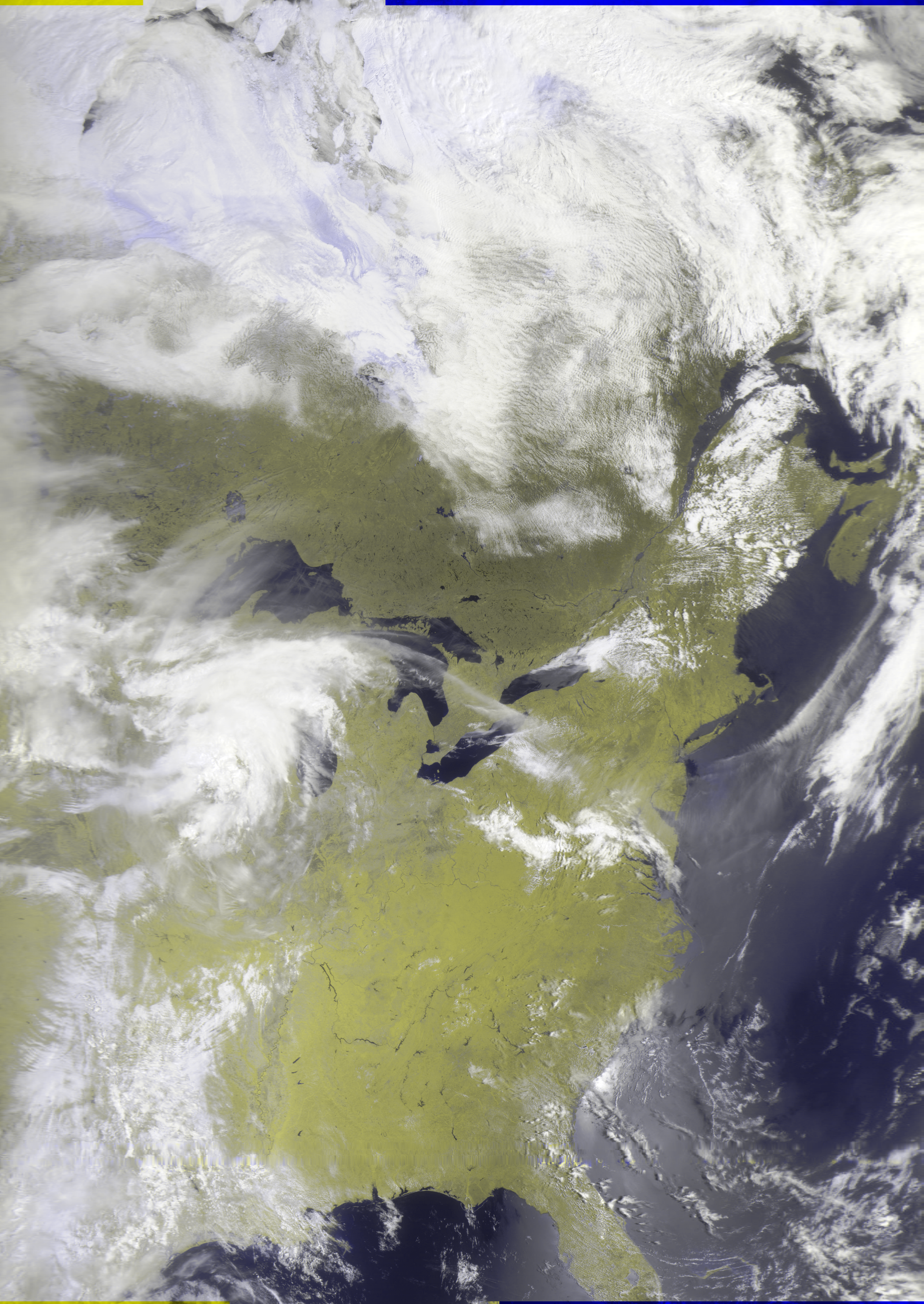
In this article, I hope to give you most of the basics you need to get started, as well as document my own journey getting into satellite imagery. This article will focus on the LRPT mode (Low Rate Picture Transmission), which exists on the VHF frequency band. This means it is within easy reach of beginners, and you too can get an image similar to this:
Quick terminology
SSTV - Slow-scan Television. A picture transmission method to send and receive pictures over radio, mostly used in ham radio.
ARISS - Amateur Radio on the International Space Station. The educational outreach program that supports amateur radio communication with and through the ISS. ARISS organizes SSTV events in their "SSTV Series".
SDR - Software Defined Radio. A system where traditional radio hardware can be implemented in software. More commonly, the term just refers to the little USB dongle you plug into your computer where your coax cable connects to.
VHF - Very High Frequency. The broad frequency range of 30 MHz to 300 MHz, which is easy for beginners to receive. SSTV, as well as FM radio, resides in VHF.
LEO - Low Earth Orbit. The altitude range that many satellites orbit in, including the ISS. When talking about satellites, LEO is usually in contrast to geostationary orbit.
What $50 buys
The quickest way to get started is to purchase an RTL-SDR + antenna kit, which includes:
- An RTL-SDR USB dongle (your "software defined radio")
- A V-dipole antenna
- Cables, mounts, and the other accessories needed
As of the time of writing, this bundle costs $49.95 on eBay. Either the v3 or v4 works, there's some technical/supply chain differences between the two that don't matter much for this.
There's a ton of stuff you can do with an SDR - from tracking satellites and weather balloons, to talking with others long-distance (with a ham license), and more. Listening to satellites is just one niche in the broader hobby of amateur radio. So if you're on the fence about buying an RTL-SDR, it could be the gateway to many more radio hobbies!
Antenna disclaimer: The starter kit should get you some decent results even with the default telescoping antenna, but the picture shown above was received with a better V-dipole antenna I built myself, with about $25 in supplies from the hardware store.
Software
Two programs you will need are gpredict and SDR++. They are both available for Windows, Mac, and Linux. gpredict is for predicting the next satellite passes, and SDR++ is the magic software that records the baseband audio, processes the radio signal into the images, and provides some helpful tools for monitoring signal strength and doing error-correction to make the process a bit more resilient to brief signal loss.
gpredict blablabla. If you can't get this software working for any reason, SatDump has the ability to show predicted passes/elevations, but it isn't as great of a menu.